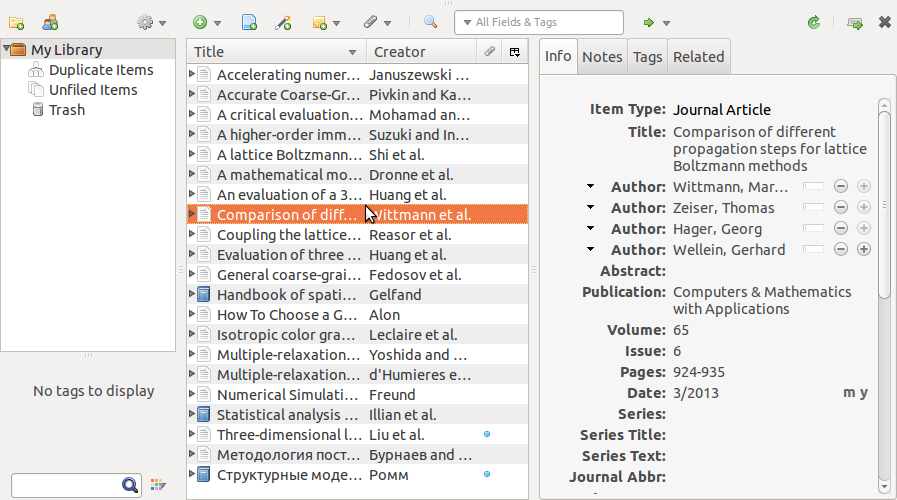
Research Papers Management With Zotero and Yandex.Disk
Zotero is an open source plugin for Firefox for managing research papers collections. You can use online zotero storage (pretty small) or use third-party sync application. I use Yandex Disk for this purpose: 10 Gb it quite enough for a moderate research library. zotero can automatically fetch article metadata (author, year, etc) from the web (like Mendeley and similar software do).
§ Prerequisities
You will need:
- Firefox (the latest version for Ubuntu 12.04 can be installed via official ppa)
- Zotero plugin for firefox
- Zotfile addon for Zotero
- Yandex disk or Dropbox for syncing settings and library between devices
- Optionally on android device: ** FolderSync Lite for syncing library folder automatically ** RepliGo pdf Reader or another pdf reader. RepliGo pdf Reader is paid, but it can add annotations and pretty smooth.
Zotfile is feature-rich addon for Zotero, but I use it for two purposes only:
- Rename and Move Attachments based on Zotero Metadata
- Extract Annotations from pdf files
After installation of Zotero and Zotfile you will need to restart Firefox.
I’ve created Zotero folder in my Yandex.Disk with two subfolders: Data for Zotero database and misc files and Library for renamed pdfs. No additional internal structure in Library is used: I wanted plain list of articles and books with name template Author2010.pdf.
§ Configuring Zotero
Here I’d like to list several important options to change. You can toggle zotero pane visibility with shortkey (Ctrl+Shift+Z by default).
Settings> Preferences> Advanced> General: SwitchStatus bar icontoNone(now you can hide plugin panel at the bottom of Firefox window).Settings> Preferences> Search: Install plugins for pdf indexing (it also need to extract metadata from pdf).Settings> Preferences> Advanced> Files and Folders: SetBase directoryto~/Yandex.Disk/Zotero, and Zotero databaseData Directory Locationto~/Yandex.Disk/Zotero/Data.
Now you will be asked to quit Firefox. Do it and move old Data directory to a new location: move all data from ~/.mozilla/firefox/<random_string>/zotero/ to ~/Yandex.Disk/Zotero/Data.
Now start zotero again.
§ Configuring Zotfile
Zotfile has many options for renaming files based on article attributes: year, author, etc. I use Author2010.pdf format, i.e. first author family name and full year.
Settings> Zotfile PreferencessetLocation Of Filesto ~/Yandex.Disk/Zotero/Library. Renamed article files will be moved there.
Set up Author2010 format for renaming. In Settings> Zotfile Preferences> Renaming Rules set Format for all Item Types except Patents to {\%a}{\%y}. I’ve also set Maximum number of authors to 1 and removed check at Add suffix when authors are omitted.
Some books are in djvu format, allow djvu handling: at Settings> Zotfile Preferences> Advanced Settings> Other Advanced Settings add djvu to Only work with the following filetypes.
§ Workflow
Now, instead of downloading pdf file I can Save to Zotero and Retrieve metadata from pdf automatically. Then I open Zotero pane (Ctrl+Shift+Z by default), right click on newly added item in libary and choose Manage Attachments> Rename Attachments. This will rename file according to defined in zotfile preferences format and move it to the Library subfolder. Double click on item will open file in Firefox’s embedded pdf viewer.
In almost all cases metadata is extracted and downloaded correctly.
§ Android side
Syncing with mobile device is strongly needed. Otherwise, I need two-way sync for downloading annotated pdfs from tablet back to desktop computer. For this purpose I use free app FolderSync Lite. This app can download and upload the whole folder from many cloud-based storage providers, Yandex.Disk among them. So, I set up two-way sync of Library subfolder.
For reading and annotating I recommend RepliGo PDF Reader. It is paid application.
Screenshot: